User Guide
Items
Items are the core data elements that flow through analysis pipelines. They serve two main purposes: carrying data for analysis and accumulating insights (facts) throughout processing.
Core Concepts
- Item Structure
Each item represents a distinct element (like a file, class, or method)
Items maintain their identity throughout the entire pipeline
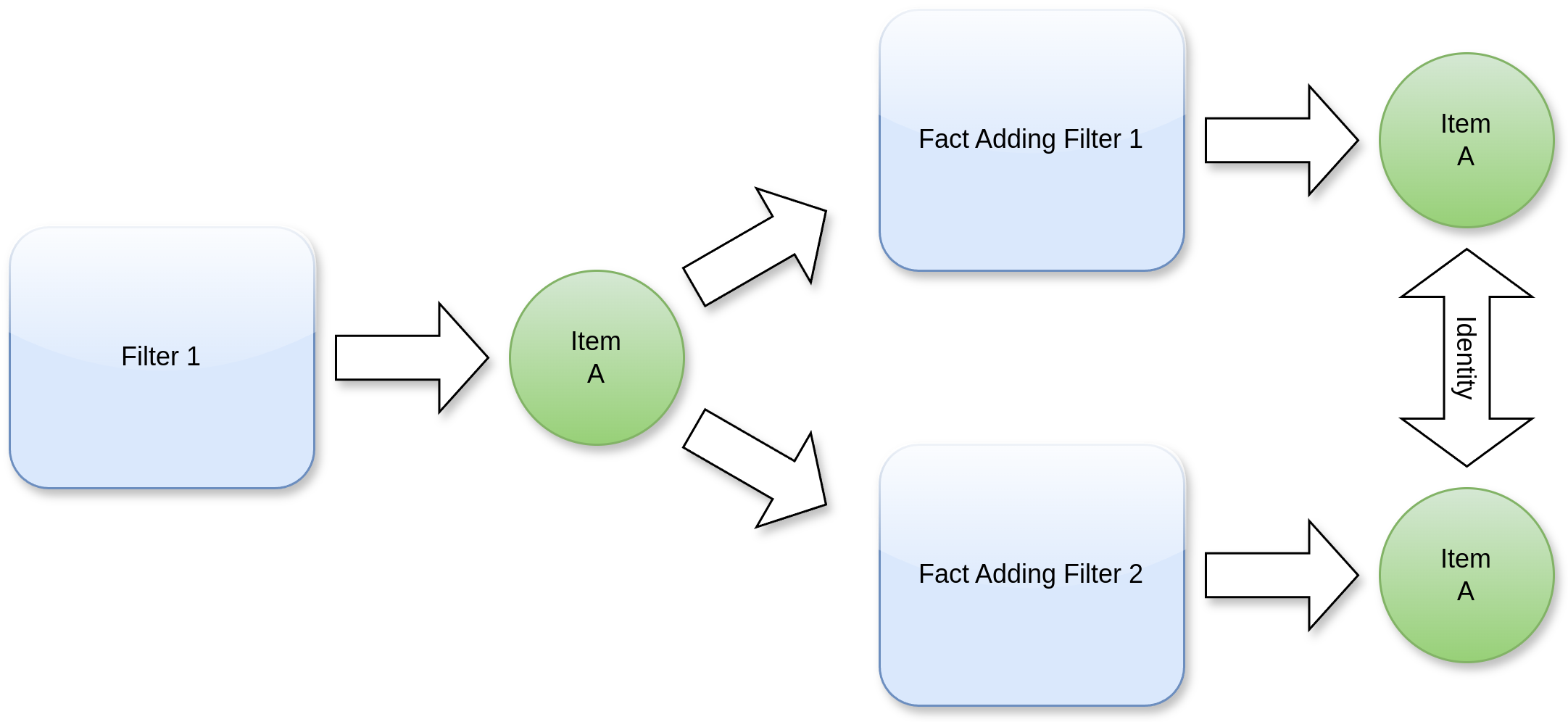
A single item can flow through multiple pipeline routes simultaneously
- Facts
Facts are pieces of metadata or insights that get attached to items:
Added by filters during processing
Accumulate across different pipeline stages
Persist with the item regardless of its path through the pipeline
Important Considerations
- Fact Management
Facts primarily serve reporting and post-processing purposes
New facts can be added at any point in the pipeline
Facts from all processing routes merge into the same item
- Best Practices
Don’t assume specific facts will be present during processing
Avoid dependencies on facts set by other filters
Design filters to be independent of fact presence
Consider fact presence as optional enrichment rather than required data
Pipeline Behavior
Items maintain their identity throughout processing
Multiple pipeline routes can process the same item concurrently
All facts gathered across different routes accumulate on the original item
Order of fact addition may vary depending on pipeline execution
When to Use Facts
For collecting metadata about analyzed elements
In final reporting stages
For post-processing analysis
When additional context is helpful but not critical
Warning
Warning
Never design filters that depend on facts being present from previous processing steps. The order of processing is not guaranteed, which could lead to unreliable results.
Filter
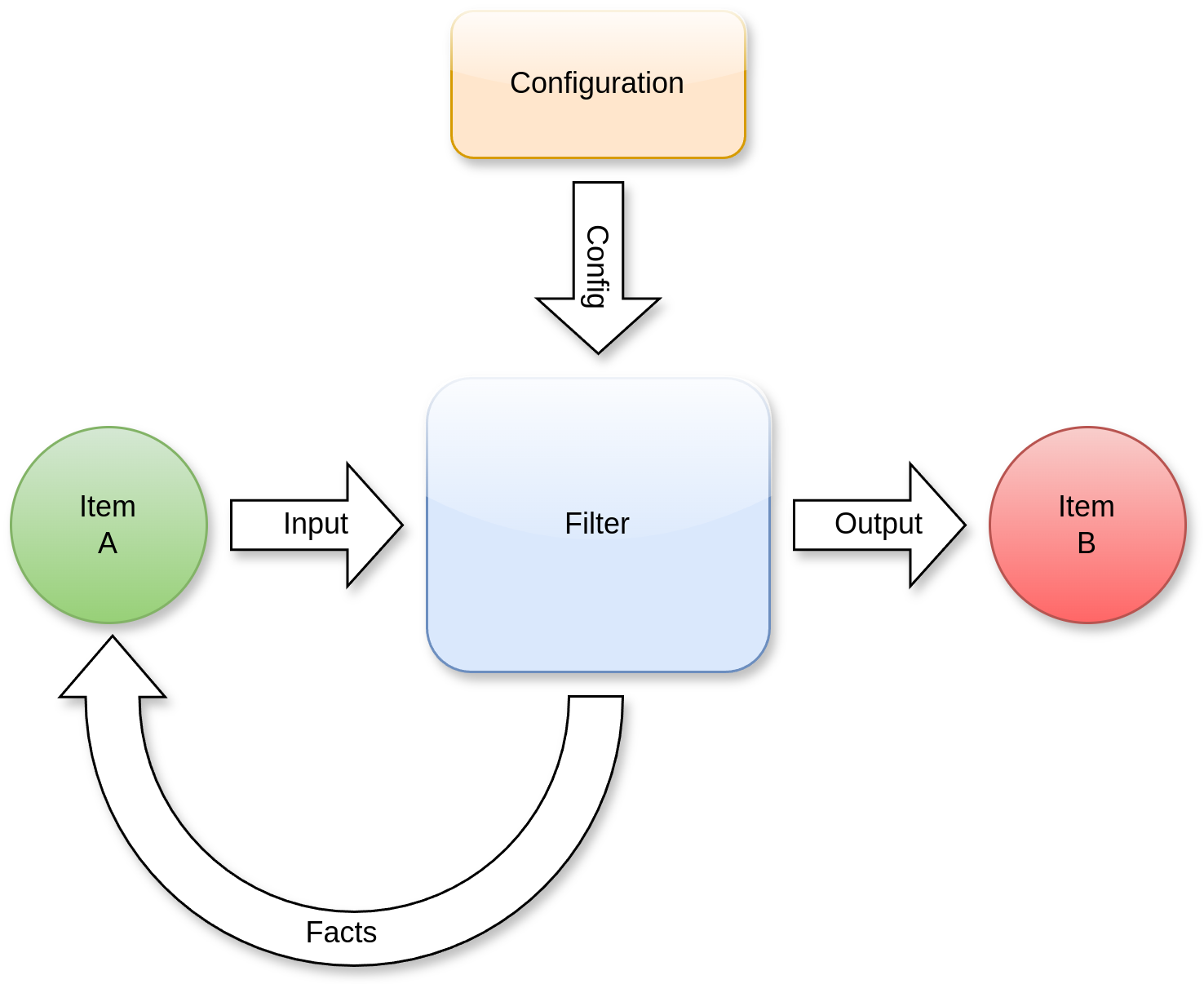
A Filter is a fundamental component that transforms input items into output items through a defined process. Filters can be chained together to create sophisticated analysis pipelines.
Core Concepts
- Processing Flow
Filters accept input items of a specific type
Each filter processes these items according to its configuration
The filter produces output items that can serve as input for subsequent filters
- Fact Enhancement
During processing, filters may enhance the original input items by adding new facts. These facts are metadata discovered during the filtering process.
Example Workflow
Consider a Python class analysis scenario:
Input: A
PythonClassItementers the filterProcessing: A
PythonMethodFilteranalyzes the class structureOutput:
Produces
ClassMethoditems representing each method in the classAdds a new fact to the original class item with key
methodscontaining the method names
Benefits
Modular Analysis: Each filter focuses on a specific aspect of analysis
Extensible Pipeline: Filters can be combined in different ways to achieve various analysis goals
Fact Accumulation: Knowledge gathered during filtering enriches the analysis results
Reusable Components: Filters can be reused in different analysis contexts
Reports
Overview
Reports are the final output stage of analysis pipelines, serving as the destination for processed items that need to be presented or exported. They provide various methods to present the analysis results, from simple data dumps to complex API integrations.
Output Formats
Reports can generate output in multiple formats: * YAML dumps for structured data * REST API calls for integration with external systems * Custom formatters for specialized output needs
Item Filtering
Reports use a labeling system to determine which items should be included. Items can be filtered using: * Dedicated filters with customizable logic * Label-based selection criteria * Threshold-based conditions
Example Use Case
A cyclomatic complexity report might only include functions where: * The complexity exceeds a defined threshold * The item is labeled as “function” or “method” * The analysis indicates potential maintenance issues
This selective reporting ensures that only relevant items appear in the final output, making reports more focused and actionable.